How we migrate websites to Craft CMS
5th May 2026

19th October 2023
Roughly a 4 minute read by
Craft CMS is a powerful content management system (CMS) and one that we always recommend here at Engage due to its simplicity. It can be used to build a wide variety of websites, including multilingual sites, very quickly and easily.
With Craft, you can easily create and manage multiple language versions of your website, with each version having its own unique content and settings. This helps to ensure that audiences all over the world can access your content in their preferred language.
We’re big fans of Craft at Engage and are proud to be an official Craft partner. You’ll find lots of benefits of the platform in our Wordpress alternative blog. Here we’ve pulled out why you should choose Craft CMS for your multilingual site…
Craft has built-in localisation support, meaning there’s no need to install additional plugins or add-ons.
Craft is incredibly intuitive, making it an easy-to-use CMS, even for more complex and multilingual sites. What’s more, the translation tools are powerful and make translating your content as simple as possible using the control panel.
The flexibility of Craft means that your multilingual site can be customised to meet all your needs. It also allows you to easily translate every little piece of content, including in your custom fields and pages.
Craft is a very scalable CMS, you can use one server to handle thousands of concurrent requests, which means that it can easily handle large multilingual sites.
Craft CMS uses a multi-site architecture to handle your multilingual content. Each language version of your website is treated as a separate site. This gives you the freedom to house different content, templates, and settings for each language version of your website.
To set up a multilingual site in Craft, you’ll need to create a new site for each language you want your website to serve.
Then, you’ll need to;
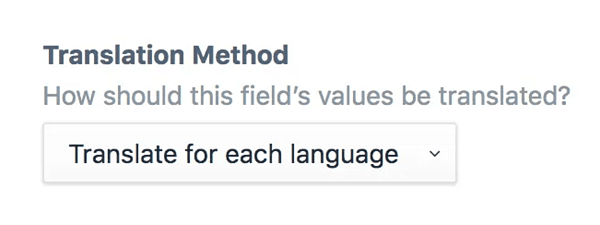
The first step in setting up a multilingual website in Craft is to define which fields you want to be translatable. In Craft, you can do this by going to Settings > Fields. For each field that you want to be translatable, select the Translate for each language option under the Translation Method setting.
Once you have defined your translatable fields, you need to create language pairs. A language pair is a combination of two languages, such as English and Spanish. You can create language pairs in the Settings > Sites section of the Craft CMS control panel.
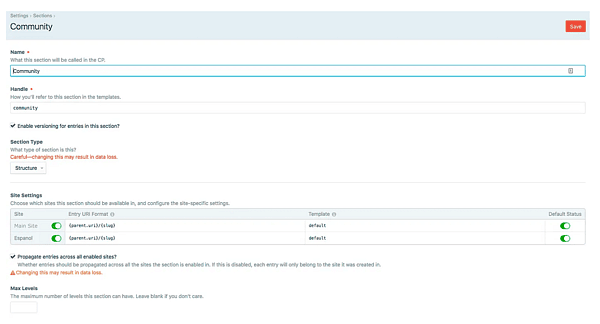
When you have created your language pairs, you can start managing multilingual content in Craft CMS. You can do this by editing entries and pages in the control panel. When you edit an entry or page, you will see a language selector at the top of the page. This selector allows you to switch between the different language versions of the entry or page.
Whether you’re looking to expand into new markets or make your website as accessible as possible across the globe, get in touch today, and we can help you build a high-performing multilingual website.
5th May 2026
20th April 2026

7th April 2026

31st March 2026
